
Most RSS readers are built like email. New items pile up. The unread count climbs. You feel pressure to clear it — or guilt when you can’t. Six months later you have an inbox of 4,000 articles you’ll never read.
Jorvik Daily News is built like a newspaper instead. Each morning’s edition is what your feeds published today. The ones from yesterday rotated off the front page. The ones from last week are gone. There is no backlog, because newspapers don’t backlog.
It’s an opinionated reader, and the opinion is this: read what catches your eye, and let the rest go.
Today’s paper, not today’s inbox
The app publishes one edition a day. Articles dated within the local calendar day flow into the paper; items older than midnight don’t appear, however unread they are.
Through the day, feeds re-fetch on each clock-hour boundary — 09:00, 10:00, 11:00 — and new same-day items accumulate into the running edition. The fetch timer re-arms after wake-from-sleep so updates don’t miss during long computer sleeps.
The front page leads with a single dominant story and a three-column masonry grid of secondary stories below. The paper prefers a lead that carries both halves — a picture that actually loads, warmed and validated before publishing, and text to read under the headline — but it never goes without one: failing that it takes a story with a picture, then one with text, then whatever it has. A lead with no picture becomes a full-width headline over a two-column deck, which reads as a paper with no art today. Sections beyond the front page get their own pages, navigable with commandleft and commandright or with the floating page indicator at the bottom of the viewport.
Set like a newspaper
Type is comfortable to read between roughly 45 and 75 characters a line. Across the full width of a large window a standfirst runs to about 113, so it is set in as many columns as its width warrants — two for the lead, one for a card — balanced to within a line of each other. A deck too short for two columns turns the lead on its side instead, with the picture in one column and the headline and text in the other.
Nothing is cut mid-sentence. The text is measured against the space before it is drawn and trimmed to the last whole sentence that fits, rather than the rendering being clipped with an ellipsis wherever the line happens to break. A headline that would end on a single orphaned word binds its last two words together so it doesn’t.
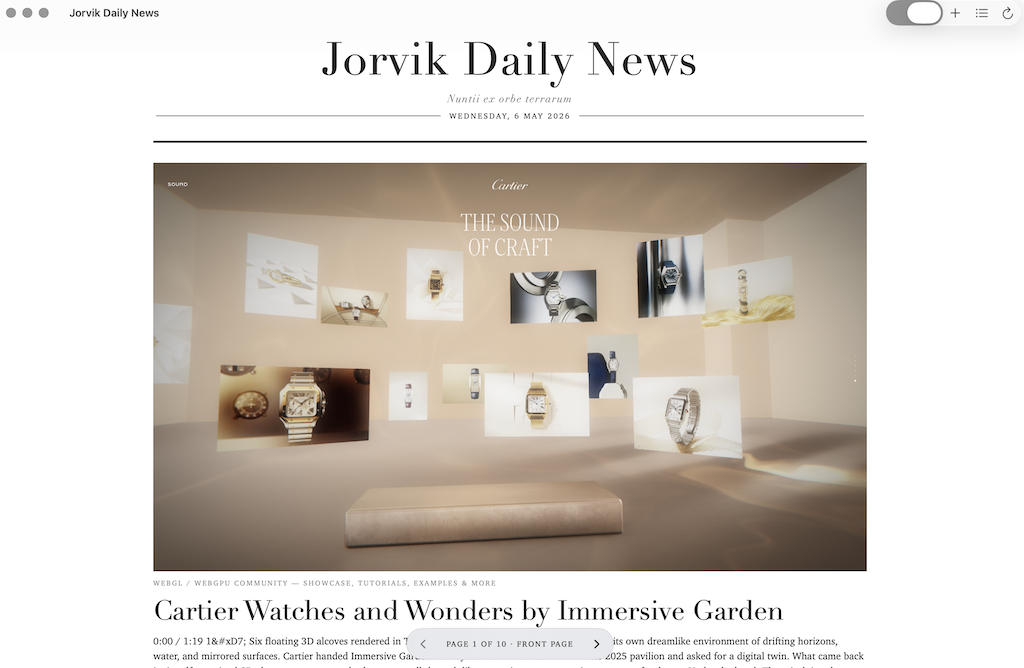
Video and PDFs play in place
A headline that points at a video opens the video — chrome-free, right inside the paper, no browser, no recommendation rabbit-hole. YouTube and Vimeo play as a bare embedded player; a direct video file plays in a native macOS player. A link to a PDF opens in a native PDF view — scroll, zoom, select text, find — instead of downloading or bouncing you out.
Most video feeds label their items, but some don’t — so any headline that will open a video gets a [VIDEO] tag added automatically when it’s missing. You always know you’re about to watch rather than read before you click, which matters when you’re somewhere a video would be unwelcome.
Sections that learn
Every feed belongs to a section: News, Tech, Culture, Business, Sport — or any custom section you create. Each section becomes a page in the edition.
Behind the scenes, an in-app classifier learns from the moves you make. Right-click any article, choose Move to…, pick a section, and two things happen: that article is pinned to that section permanently, and the classifier trains on the move. After three sections each accumulate three or more training documents, the classifier starts predicting sections for new articles automatically. Until then, articles fall back to their feed’s declared section.
The classifier is heuristic, not magical — a naive Bayes implementation with Laplace smoothing, English stopword filtering, and a length filter on tokens. It’s wrong sometimes. When it is, you correct it once and it learns. The model is yours; nothing leaves your Mac.
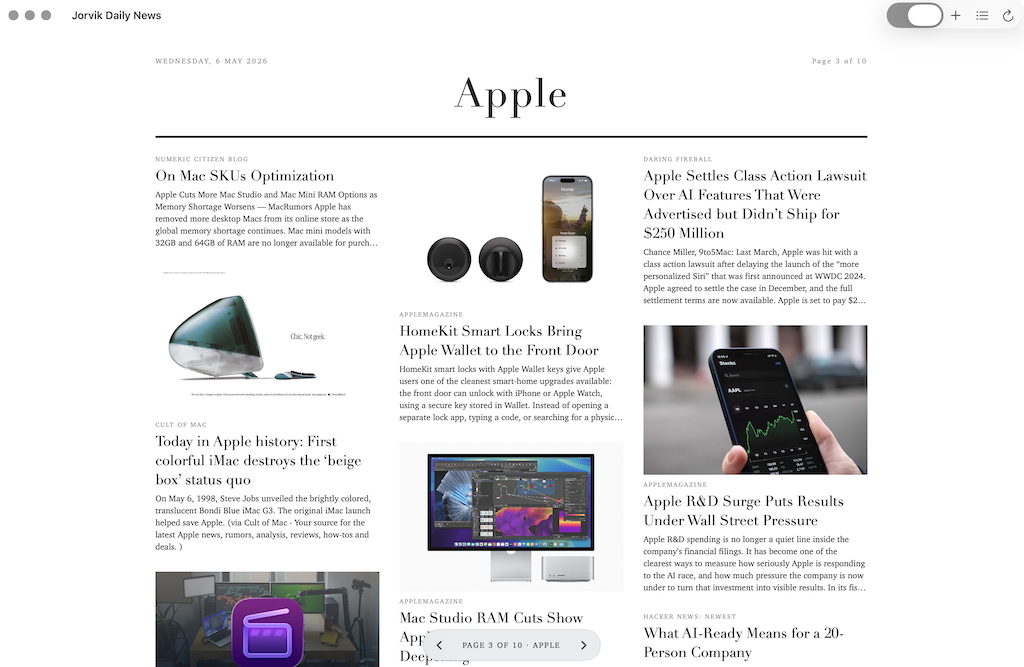
A reader, not a redirect
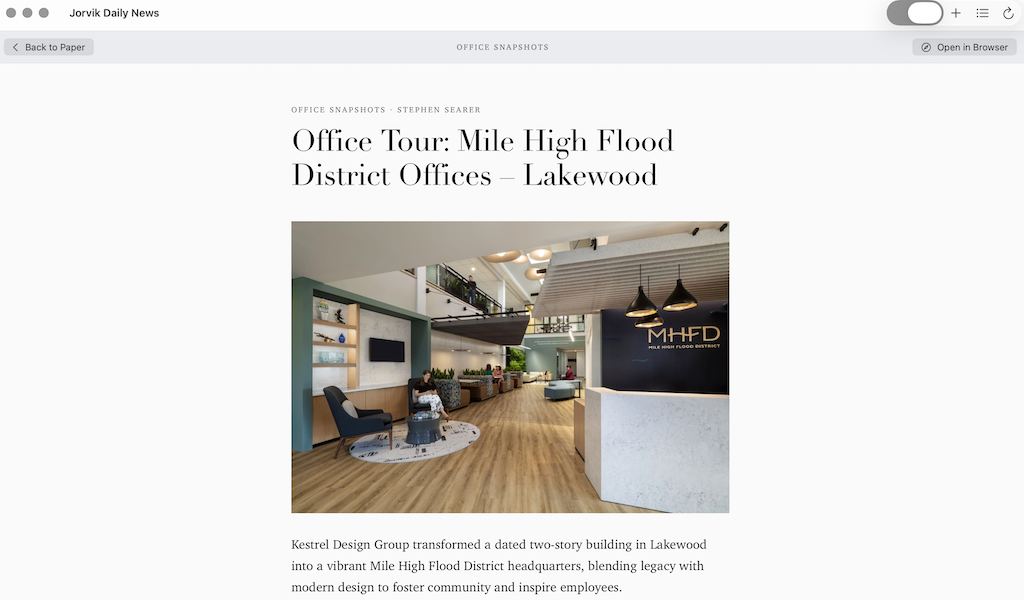
Click a headline and the paper makes way for a clean reading view — not a modal, not a popup, just the article. Mozilla’s Readability extracts the main content from the source page; a serif stylesheet renders it at a fixed 680 pixel column width, dark-mode aware.
No ads. No trackers. No pop-ups. JavaScript is disabled in the extracted reader pane, so nothing on the page can run — not even the keychain prompts some sites push for “WebCrypto Master Key” access. The reader uses ephemeral WebKit sessions, so no cookies, local storage, or site data persist across sessions.
The reader header always tells you where the material comes from: the feed’s name, and beneath it the destination host — economist.com, youtube.com — in plain monospace. It’s there in every reading mode, so even a chrome-free video tells you its source at a glance. From the same header you can re-file the article into another section (training the classifier as you go) or exclude its source entirely, without leaving the page.
If Readability can’t parse the page (paywalled sites, JavaScript-rendered SPAs, strange CMSes), the reader doesn’t dead-end you — it renders the real page inline, in-app, with Open in Browser always in the header as the escape hatch. And it is measured rather than assumed: a page that lays out nothing to read gets an explanation and a link to your browser instead of an empty pane. The live page is the one place the app shows you somebody else’s page, so it does not run that page’s scripts unless you ask it to — the notice tells you how, if you would rather have working pages. The extracted reading view never runs any.
Feeds without anxiety
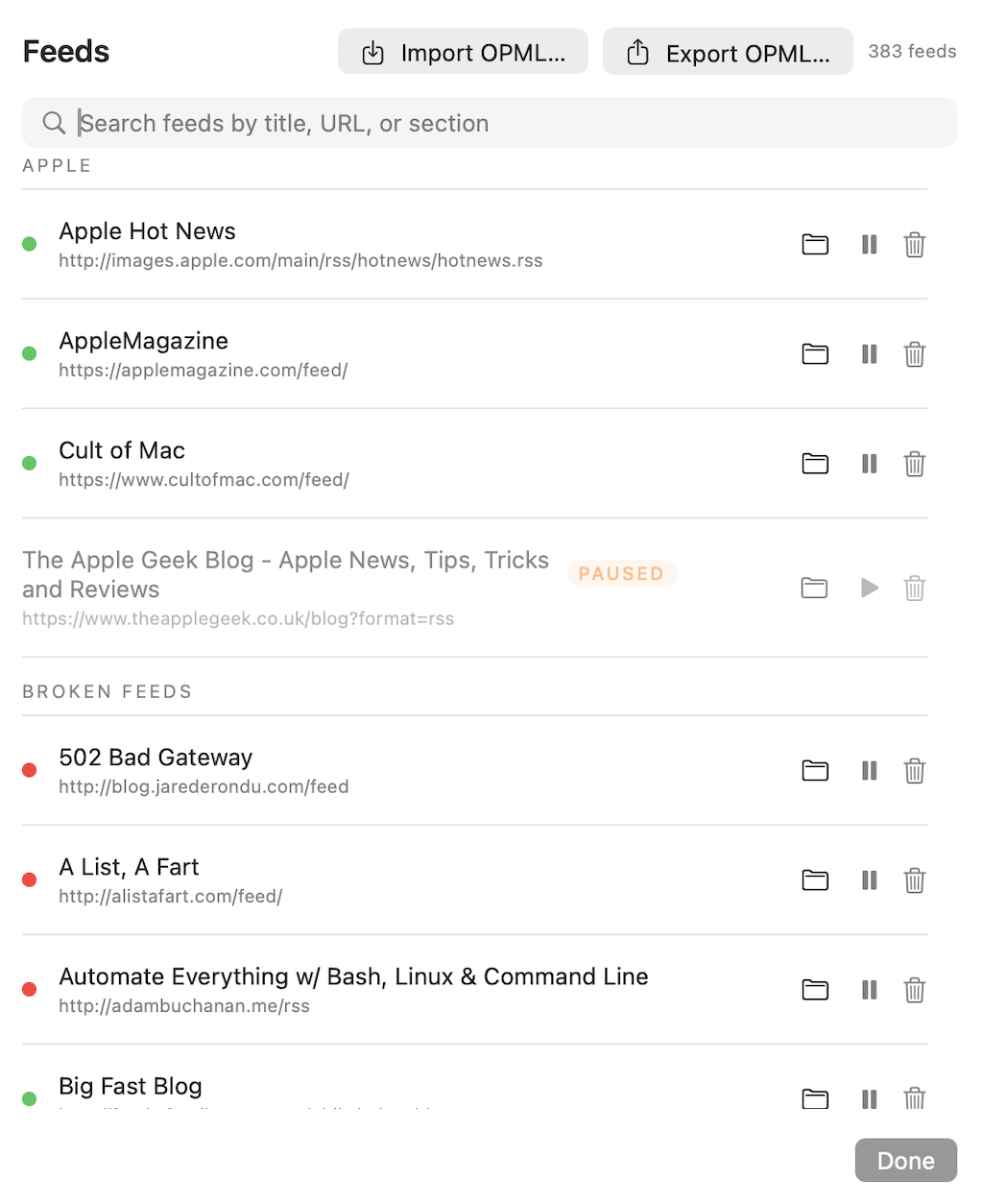
Feed management is its own pane. You can:
- Add a feed by URL — either the feed’s direct URL or just the website’s homepage. The app discovers feeds via
<link rel="alternate">tags, with fallback probing for common paths (/feed,/rss,/atom.xml, etc.). If a stored feed URL stops working, the app re-runs discovery automatically and updates the URL if it finds a working one. - Pause a feed instead of deleting it. Pausing hides its items immediately and stops the fetcher; un-pausing brings it back. Useful for noisy sources you want to silence for a while without losing the subscription.
- Move feeds between sections, including to brand-new sections you create on the fly.
- Search the list by title, URL, or section in real time.
- Bulk import via OPML and export the same way. Import is dedup-safe both within the file and against your existing feeds, so an OPML that lists the same feed under three categories adds it once.
Each feed shows a health pill next to its name — green if its most recent fetch succeeded, amber if it’s currently failing but succeeded within the last 30 days, red if it’s been failing for longer or has never succeeded. The pill makes a 300-feed collection actually manageable: at a glance you can see which sources have gone dark.
Quietly good plumbing
Things you don’t notice unless they’re absent:
- Dual format support. RSS 2.0 and Atom 1.0 from a single parser.
- Flexible date parsing. ISO8601 (with or without fractional seconds), RFC822 in all its dialect variants, and a date-only fallback. Undated items rank last on the front page rather than masquerading as “newest”.
- Aggregator target resolution. When a feed item points at a Hacker News, Reddit, Lobste.rs, or Slashdot discussion, the reader extracts the underlying article URL and shows that instead. The discussion is still one click away via Open in Browser.
- Page metadata enrichment. An item missing a picture or a standfirst gets an
og:image/og:descriptionlookup against the article URL — one fetch answers both. It aims to put a picture on at least 30% of a page’s articles, measured against what you have not yet read rather than the whole edition, so the paper does not lose its pictures as you work through it. - Smart image selection. When feeds ship multiple image sizes (looking at you, Guardian), the largest declared size wins if it’s 400 px or wider. Sub-48-pixel images (tracking pixels, broken CDN placeholders) are rejected.
- Photographs of people crop around the face. Visual saliency alone finds whatever is loudest in a frame, which on a portrait is the teeth and the collar rather than the head. Face detection runs first, and a subject taller than the space keeps its top — a cropped chin reads as a crop, a cropped crown reads as a mistake.
- Pictures that fail get another chance. A missing file or a tracking pixel is a settled fact and is remembered. A timeout or a rate limit is not, and is tried again, so a moment of congestion doesn’t leave the paper blank until you quit it.
- Cross-feed deduplication. The same article appearing in two feeds (very common in tech) is collapsed by canonical link before it reaches the page.
- Round-robin feed ordering. After dedup, items distribute across feeds so no single source dominates the front page.
- HTML entity decoding. No more
’or'in your headlines. Numeric references are decoded arithmetically rather than from a list, and named ones come from the HTML5 standard’s own table, so an unusual one is not a fresh bug.
What it doesn’t do
- No cloud, no account, no sync. Everything lives under
~/Library/Application Support/JorvikDailyNews/—feeds.json, daily edition archives, read-state, classifier state. All JSON, all on-device. - No telemetry, no analytics, no crash reporters. The app does not phone home. Nothing about your reading habits ever leaves your Mac.
- No JavaScript in the extracted reader. In the clean reading view, sites can’t track you, can’t mine cryptocurrency in the background, can’t prompt for keychain access. (The live-page fallback and embedded video are real renders and do run their own JavaScript — that’s the trade for showing the actual page in app.)
- No unread counters or notification badges. Nothing nags you. Nothing judges you.
- No subscription. It’s free. The source is on GitHub.
Keyboard shortcuts
| Shortcut | Action |
|---|---|
| commandN | Add a feed |
| commandR | Refresh now |
| shiftcommandF | Manage feeds |
| shiftcommandO | Import OPML |
| shiftcommandE | Export OPML |
| command1 | Front page |
| commandleft / commandright | Previous / next page in the edition |
| esc | Back to the paper from the reader |
Auto-update
Updates are handled by Sparkle. The app checks for new versions automatically once a day in the background and surfaces them as a non-modal alert. You can also trigger a check from Jorvik Daily News → Check for Updates… at any time.
Requirements
macOS 14 (Sonoma) or later. Universal binary (Apple Silicon and Intel).
Installation
The recommended path is the installer — it bypasses macOS’s download quarantine and App Translocation, so the first launch is clean.
- Download JorvikDailyNews.pkg and double-click to install
- Launch Jorvik Daily News from your Applications folder
- Add a feed (commandN) or import an OPML file (shiftcommandO) to begin
If you prefer the .zip: download JorvikDailyNews.zip, unzip, and drag Jorvik Daily News.app to Applications. Subsequent updates flow through Sparkle either way.
Or install it with Homebrew: brew install --cask perpetualbeta/jorvik/jorvik-daily-news
Building from source
Jorvik Daily News builds via the shared Jorvik release.mk. With the jorvik-release sibling repo cloned alongside it and GNU Make 4 installed:
- Clone the repo:
git clone https://github.com/PerpetualBeta/JorvikDailyNews.git - Run
gmake release - The signed, notarised, stapled
.pkgand.zipland in.build/