
Most screensavers are loud. Cycling photographs, rolling messages, slideshows of your beach holidays. Reverie is the opposite.
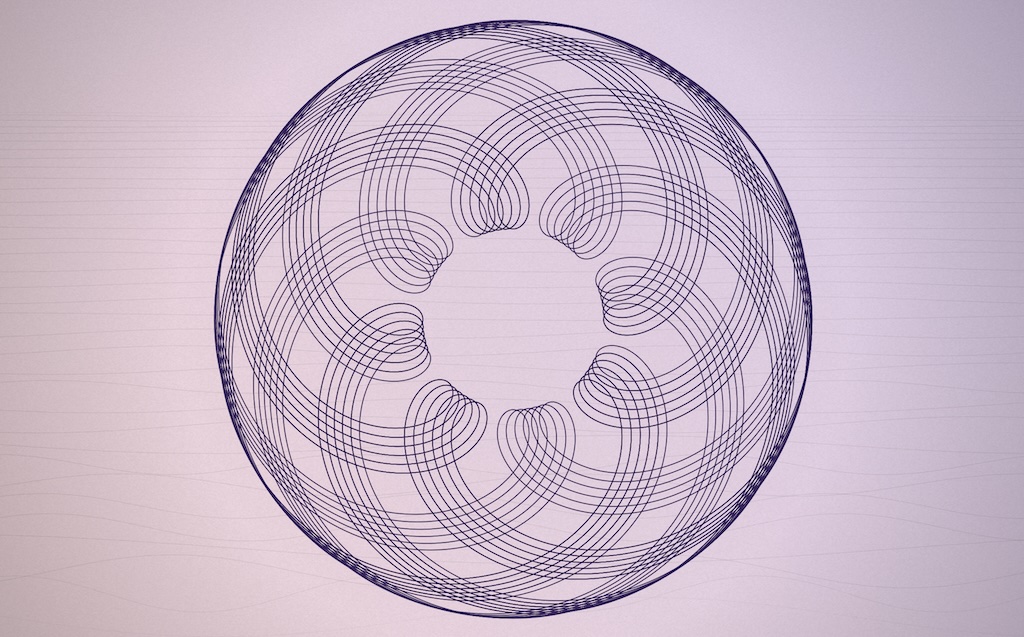
Hypotrochoids and epitrochoids — the kind of curve a child draws with a Spirograph — appear one stroke at a time on a pastel canvas, rotated copies layered into a dense rosette, then fade. Underneath, a sketched wavescape rolls toward the horizon. The whole thing breathes between two ink tones; the paper drifts through twelve hand-tuned colour palettes; the page is finished with a vignette and grain so it reads as ink on paper, not pixels on glass.
There’s nothing to configure. There’s no settings panel. You just watch.
The cycle
Each composition follows the same six beats:
- A pen begins drawing a curve from a single point. The path is a roulette — a small circle rolling inside (hypotrochoid) or outside (epitrochoid) a larger one — with parameters drawn from a continuously-random parameter space.
- When the curve closes, the pen lifts and the same shape is drawn again, rotated by a small angle. After 6 to 12 such passes (varying per cycle) the rosette is dense.
- The completed composition holds for a few seconds, then fades.
- A new curve with a different lobe count begins immediately. The recent six lobe counts are excluded from each pick so successive curves never repeat over a meaningful window.
- The colour pulse runs independent of the curve cycle — strokes breathe between the palette’s two ink tones over a slow four-second sine wave.
- Every thirty seconds the background palette begins a five-second Lab-space cross-fade to a new palette. Twelve are tuned; the canvas slowly shifts hue without any single transition catching the eye.
The curves
Roulette curves are mathematically simple and visually rich. A hypotrochoid is what you get when a small circle rolls inside a larger one with a pen attached at a fixed offset; an epitrochoid is what you get when the small circle rolls outside. The lobe count, smoothness, and reach of the curve are determined by three parameters: the closure denominator q, a coprime numerator p, and the d/r offset ratio.
Reverie picks q from {3, 4, 5, 6, 7, 8, 9, 10, 11, 12, 13, 14, 15, 17, 19}, takes a coprime p, and chooses one of three rotation modes for the layered passes — symmetric (a tidy 2π / (q · passes)), golden-angle (non-resonant, never closes), or random walk. The result is that no two cycles look quite the same even when they share a base shape.
Paper, not pixels
The aesthetic isn’t accidental. Backgrounds are warm pastels, never pure white. Strokes are dark ink tones — burgundy, navy, plum, indigo, bronze — tuned in pairs so the breathing transitions stay in the same register. Cross-fades between palettes go through Lab colour space rather than RGB, so the mid-tones don’t turn muddy. A subtle paper grain rides on top, and a vignette rolls the corners toward darker. The composition wants to look like something a draughtsman would produce.
Multiple displays
macOS instantiates one ScreenSaverView per attached display, and Reverie owns its engine state per view. So curves, palettes, and pulsation phases drift independently across screens — you don’t get the cinema-multiplex effect of every monitor showing the same frame in lockstep. Each screen does its own thing.
What it doesn’t do
- No preferences. The brand contract is “no preferences”, and Reverie holds the line. There is no settings panel because there is nothing to adjust.
- No telemetry. Nothing is reported, logged, or sent anywhere.
- No camera, no microphone, no network access. The only thing Reverie reads is the system clock, and the only thing it writes is pixels.
- No auto-update, unless you use Homebrew. Screensavers don’t have the right lifecycle for Sparkle — no persistent process, no menu to host a “Check for Updates” command. Install from the
.pkgand nothing checks for you; watch the GitHub releases page. Install from the tap andbrew upgrade --cask reveriedoes the work, which makes Reverie the one Jorvik app Homebrew genuinely keeps current.
Installation
- Download Reverie.pkg from the latest release and double-click to install
- The installer drops
Reverie.saverinto/Library/Screen Savers/— system-wide, available to every user on the Mac - Open System Settings → Screen Saver and pick Reverie
Or install it with Homebrew — note this places Reverie.saver in your own ~/Library/Screen Savers rather than system-wide: brew install --cask perpetualbeta/jorvik/reverie
Every release also carries Reverie.zip, holding the same signed and notarised Reverie.saver. That is what the Homebrew cask fetches. You can take it directly and drop the saver into ~/Library/Screen Savers yourself, but the .pkg is the better route for a browser download: the installer is a trusted system process, so its output arrives without the quarantine flag a downloaded archive carries with it.
If Reverie doesn’t appear in the list immediately, close System Settings and reopen it — macOS sometimes needs a restart to detect newly installed screensavers.
To uninstall: pick a different screensaver in System Settings, then delete /Library/Screen Savers/Reverie.saver.
Requirements
macOS 14 (Sonoma) or later. Universal binary (Apple Silicon and Intel).
Building from source
Reverie builds via the shared Jorvik release.mk. With the jorvik-release sibling repo cloned alongside it and GNU Make 4 installed:
- Clone the repo:
git clone https://github.com/PerpetualBeta/Reverie.git - For a fast local install (arm64-only, ad-hoc-signed):
gmake dev-install - For the test app harness (an NSWindow rendering the same engine the saver uses, no install required):
gmake run - For signed, notarised, stapled artefacts ready to ship — both the
.pkgand the.zipthe cask uses:gmake release